



October 12, 2026 – Reading time: 15 minutes
In our previous article on moving from Level 1 to Level 2 in Generative AI (GenAI) Integration, we explained how organizations can move beyond basic experimentation and begin defining repeatable AI use cases, complete with prompts, expected outputs, roles, training needs, and KPIs. Here, we go into the next level by focusing on how the defined use cases can be materialized. This is the third article in our four-part series on GenAI Integration.
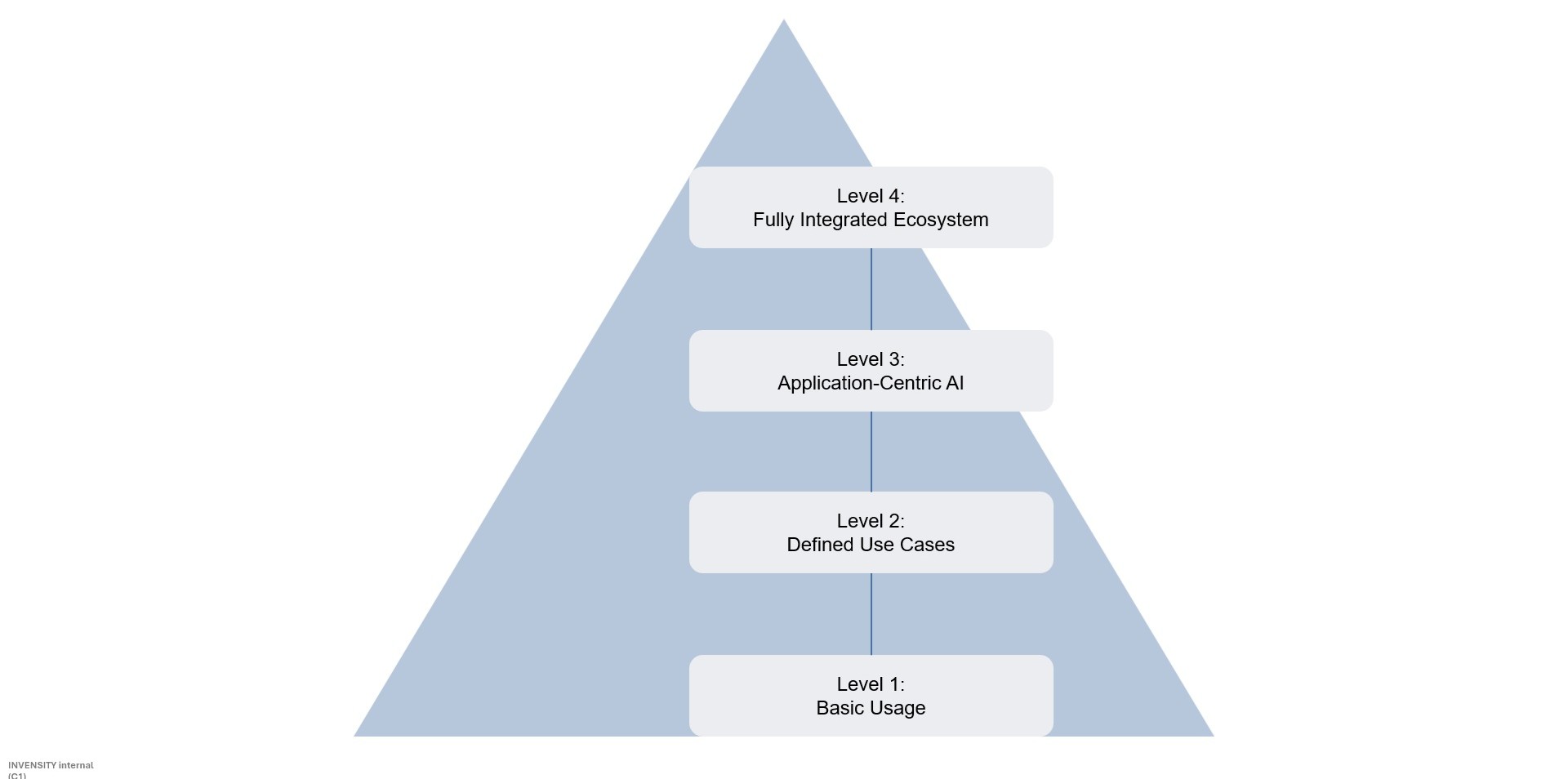
For more information about all the levels of GenAI integration, we suggest reading our first article in this series.
The Importance of Reaching Level 3 in GenAI Integration
Levels 2 and 3 represent two fundamentally different stages of GenAI integration:
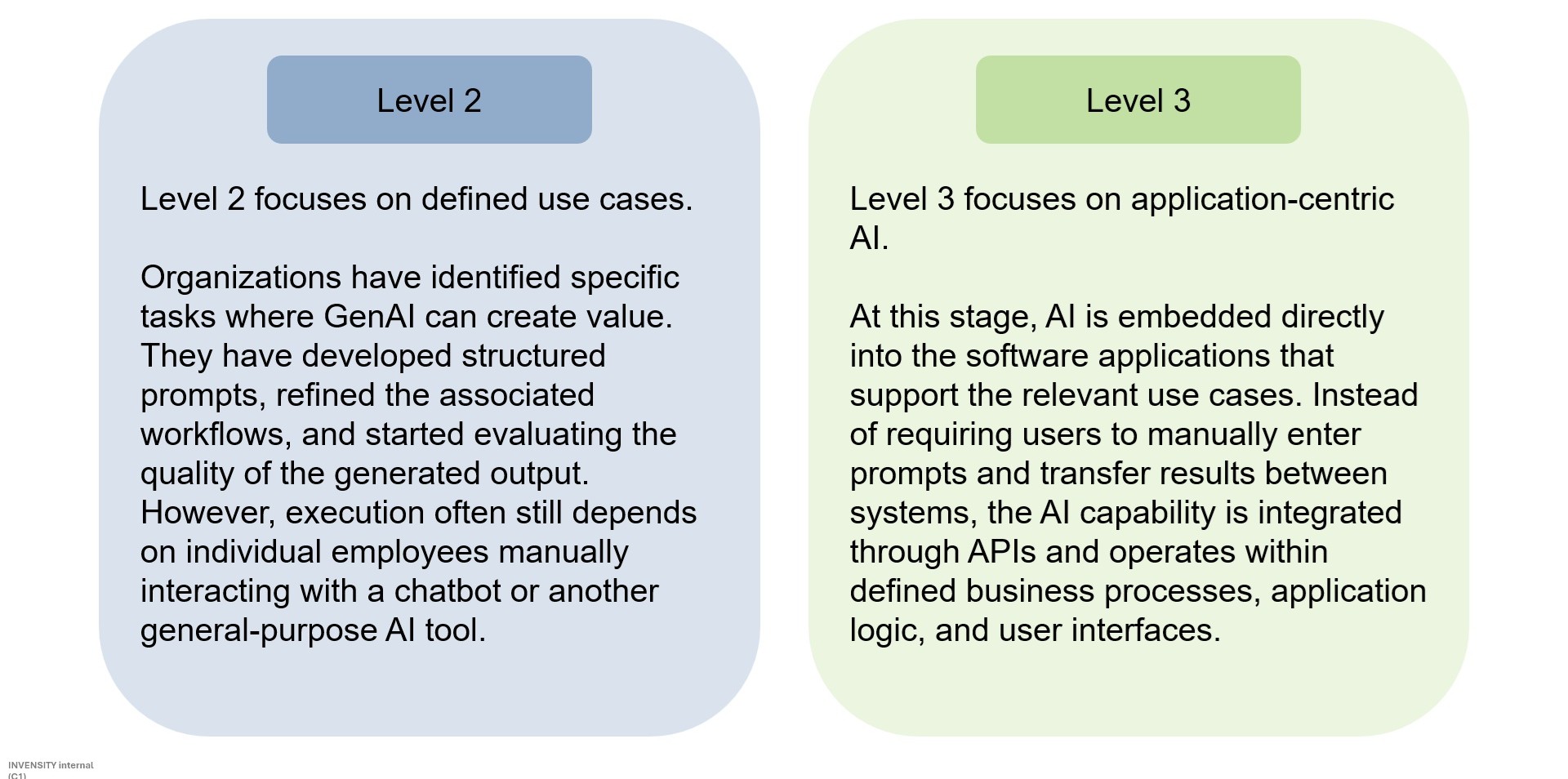
This transition is important because Level 3 moves an organization beyond isolated or user-dependent AI adoption. AI is no longer merely a tool that individual employees use at their own discretion. It becomes a managed capability within the organization’s application landscape.
Embedding AI into business applications enables a higher degree of automation. Inputs can be retrieved from the relevant systems, predefined processing steps can be executed consistently, and results can be returned directly to the applications in which employees already work. This reduces manual effort, limits process interruptions, and increases the value that can be generated from previously defined AI use cases.
Application-centric AI also introduces an essential governance layer. Similar to other enterprise software and tools, AI capabilities can be centrally administered and controlled. Organizations can define who is permitted to use a capability, which data it may access, which models and configurations are applied, and how outputs are monitored. They can also implement versioning, logging, quality controls, security requirements, and escalation mechanisms.
As a result, Level 3 supports reproducible and consistent outcomes across the organization. Employees no longer need to know how to formulate the right prompt or select the appropriate AI model. The relevant instructions, context, data sources, and quality requirements are built into the application and workflow. This makes the use case accessible to a broader group of employees while reducing dependence on individual prompting skills.
An application-centric AI solution can be implemented using agentic AI, particularly when the use case requires the system to coordinate several tasks, make decisions within defined boundaries, or interact with multiple applications. However, an agentic architecture is not a prerequisite for reaching Level 3. A deterministic workflow that uses AI for clearly defined steps can be equally effective. The defining characteristic is not whether the solution uses agents, but whether the AI capability is embedded, governed, repeatable, and scalable.
How to Advance from Level 2 to Level 3
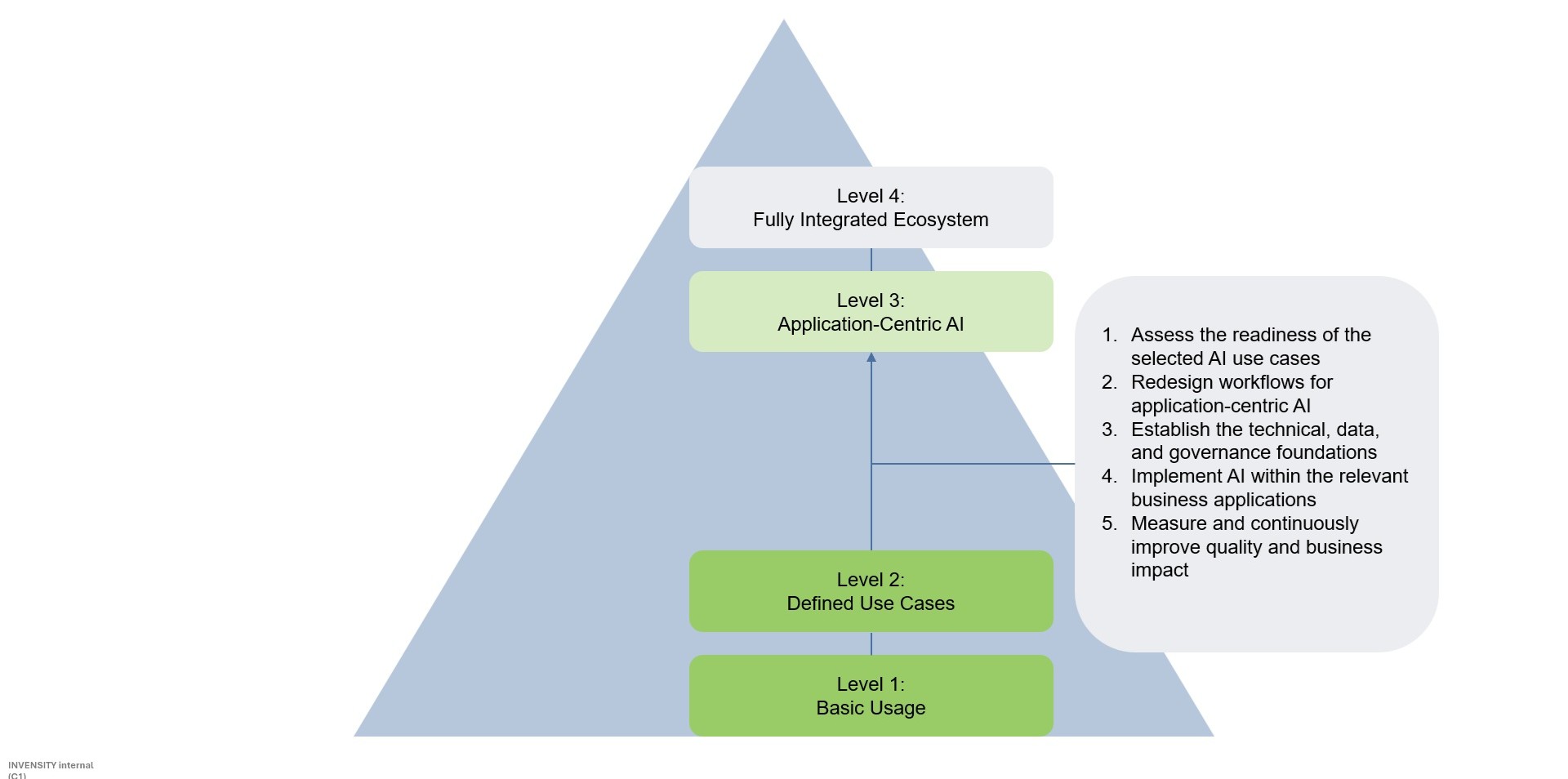
Many organizations are already experimenting with AI, but fewer have successfully embedded it into their core applications and processes.
If businesses and other organizations want to reach Level 3, the following five steps are crucial to follow:
- Assess the readiness of the selected AI use cases.
Determine whether the use cases are sufficiently mature, valuable, repeatable, and suitable for integration into an application-supported workflow. - Redesign workflows for application-centric AI.
Define how users, applications, data, AI models, and control mechanisms should interact within the future process. - Establish the technical, data, and governance foundations.
Provide the required architecture, APIs, data access, security mechanisms, ownership structures, monitoring capabilities, and governance standards. - Implement AI within the relevant business applications.
Integrate the AI capability into the software environment in which the use case is executed, whether through a deterministic workflow, an agentic approach, or a combination of both. - Measure and continuously improve quality and business impact.
Use defined metrics and KPIs to evaluate output quality, process performance, user adoption, automation levels, risk, and the business value generated by the solution.
1. Assess the Readiness of the Selected AI Use Cases
The first step is to assess your AI use cases and determine which ones are truly ready for application-centric integration. Not every promising AI use case should immediately become an embedded feature or automated workflow.
A strong Level 3 candidate must meet several conditions:
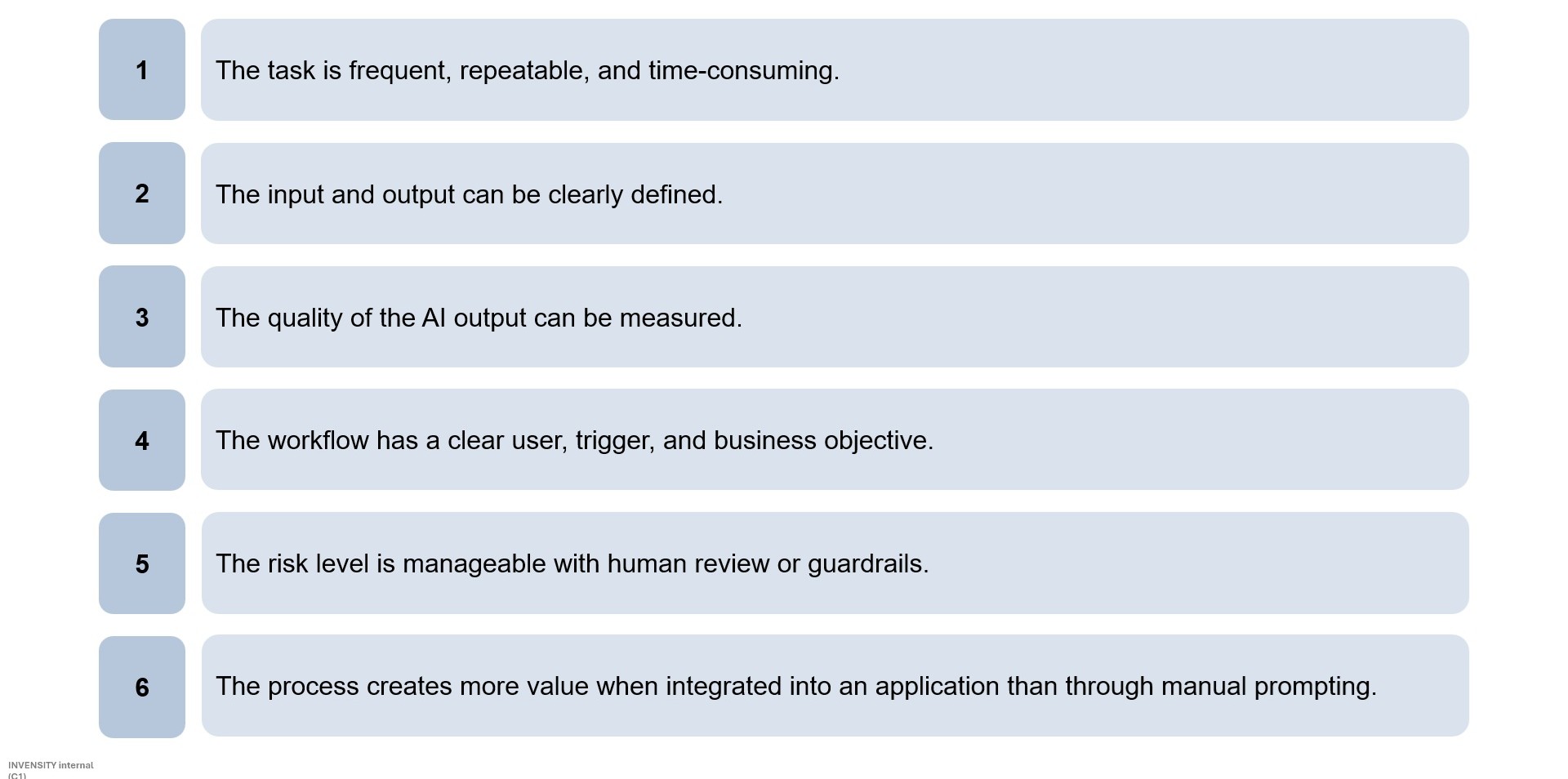
As an example, a team that uses GenAI to summarize reports at Level 2 may be ready for Level 3 if the report structure is consistent, the source documents are accessible, the summary format is standardized, and the output can be reviewed before distribution. The same cannot be said for tasks with unclear inputs, inconsistent data, or major compliance implications, which require further refinement before automation.
The use case should also be checked against the EU AI Act‘s risk tiers. Is it unacceptable, high-risk, limited, or minimal risk? A use case touching biometrics, employment, credit, or safety-critical decisions likely falls under Annex III and needs a compliance review before automation.
The objective should not be to automate as many AI use cases as possible. It is to identify the use cases where AI can reliably reduce effort, increase consistency, or improve speed without creating unmanaged risk.
2. Redesign Workflows for Application-Centric AI
The second step is to redesign your tasks’ workflow around the application, not the prompt.
At Level 2, the user is still often responsible for opening an AI tool, writing a prompt, inserting context, checking the output, and transferring the result into another system. At Level 3, the AI should become part of the process itself. This means defining how the user interacts with the AI-enabled application from start to finish.
When redesigning the workflow, businesses should define the specific events that will trigger the AI’s action, the kind of data or documents the AI needs, and what the AI should generate. The redesigned workflow should also consider the location of the output, the person who will act as the AI’s quality gate, and solutions for when the output is incomplete or incorrect.
3. Establish the Technical, Data, and Governance Foundations
The third step is to build the technical, data, and governance foundations needed for reliable AI integration.
Businesses must have the architecture that connects AI capabilities with enterprise systems, data sources, user interfaces, and monitoring tools. Depending on the use case, this may involve APIs, retrieval-augmented generation, document databases, workflow automation tools, identity and access management, logging, and human approval steps.
The technical foundation should be able to answer the following questions:
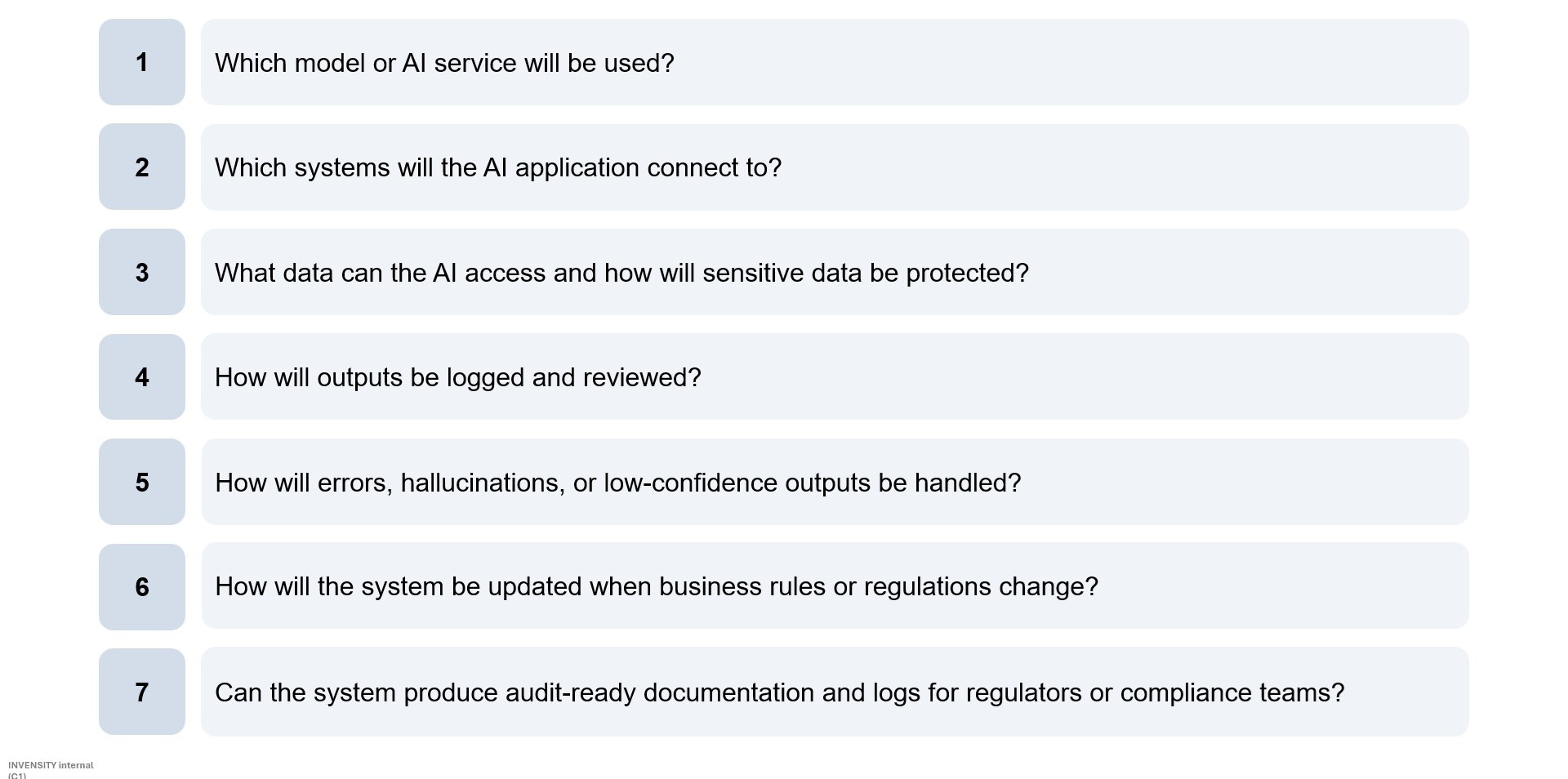
Moving to Level 3 also raises the stakes from a governance perspective. Once AI is embedded directly into business applications and acts on live data through APIs, it becomes part of the system of record instead of a person consciously choosing to use it.
This shift matters under regulations like the EU AI Act, where an AI system is classified as high-risk either because it functions as a safety component of a product already covered by the EU harmonization legislation, or because it falls under one of the use cases listed in Annex III.
High-risk AI deployers must maintain a documented risk management system, ensure data governance, keep detailed technical documentation, enable automatic logging, and provide for human oversight along with safeguards for accuracy, robustness, and cybersecurity throughout the system’s lifecycle.
4. Implement AI Within the Relevant Business Applications
The fourth step is to implement the selected AI use cases within relevant business applications.
A Level 3 implementation typically requires more roles than a Level 2 use case. Aside from the business user or prompt engineer, organizations may need an AI product owner, software engineer, data engineer, UX designer, domain expert, compliance specialist, security specialist, and change manager. Each role helps ensure that the AI application is technically functional, useful for the target users, and safe enough for the intended context.
Rollout teams should also include a compliance specialist from the pilot stage, not after. Keep in mind that retrofitting governance after a workflow is live is far costlier than designing it in.
Implementation should begin with a controlled pilot. This allows the team to test whether the AI integration works in the real workflow, whether users trust the output, and whether the process actually saves time or improves quality. From there, the business can expand the rollout in stages.
5. Measure and Continuously Improve Quality and Business Impact
The fifth step is to evaluate whether the AI integration is delivering measurable value and improve its quality and business impact continuously.
At Level 2, KPIs often focus on output quality, prompt consistency, and user adoption. At Level 3, the metrics should expand to include process performance, system reliability, business impact, and risk control.
Useful Level 3 KPIs may include:
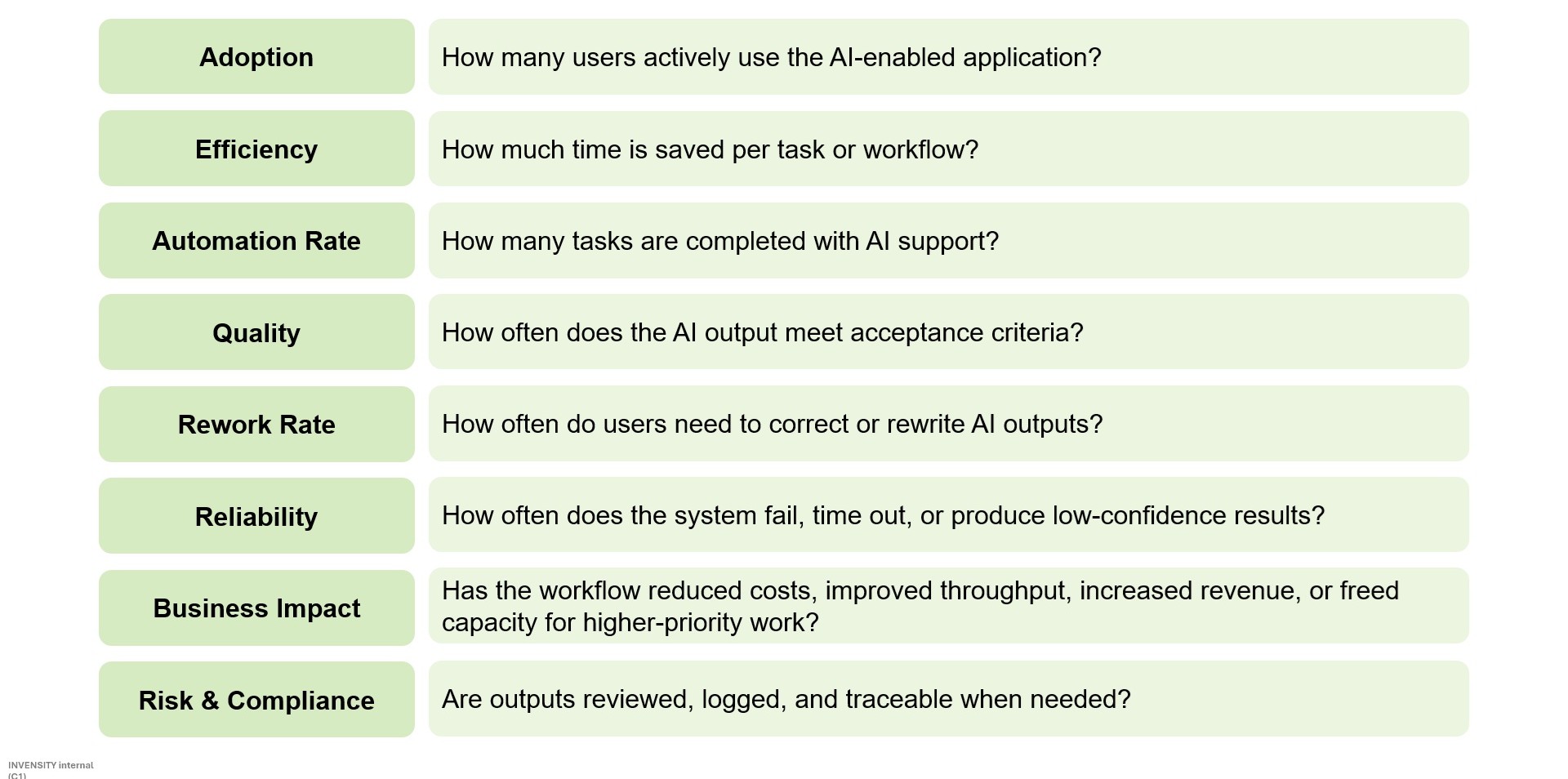
The most successful implementations compare these metrics against a baseline. Before embedding AI into a workflow, businesses should know how long the process currently takes, how many errors occur, how much manual effort is required, and what quality level is expected. Without a baseline, it becomes difficult to prove whether the AI application actually improved the process.
Levelling Up
Is your organization ready to move from defined AI use cases to application-centric AI integration? Our Software & Data Technology experts can help you take the next step in your GenAI integration journey.
Meet up with our Head of Software and Data Technologies, Dr. Marc Großerüsckamp, for an in-depth discussion of your challenges and ideas.
Author
 Dr. Marc Großerüschkamp
Head of Software & Data Technologies

Resources
Learn more
Artificial Intelligence
Software Engineering
Artificial Intelligence
Artificial Intelligence